Managing enrichments
Everything you need day to day is on the Data Enrichment list.
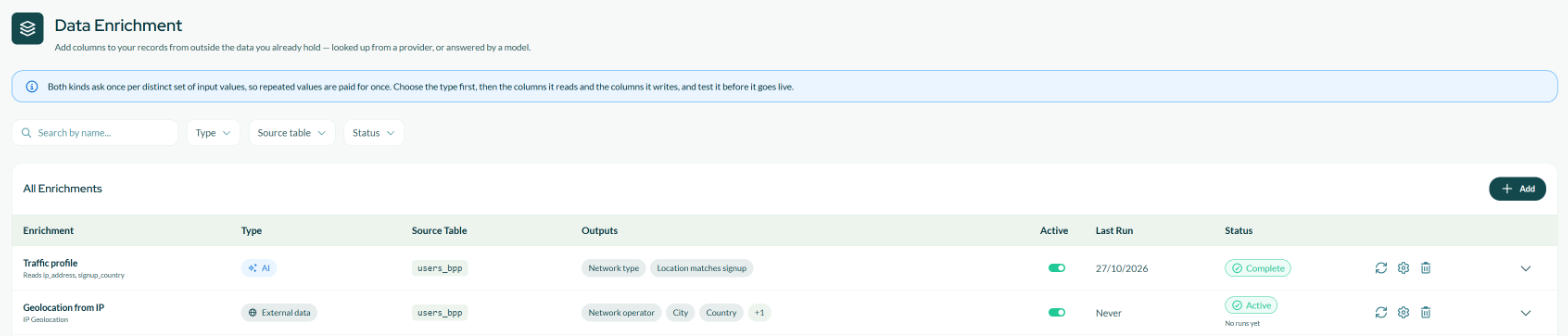
One row per enrichment. Search by name, or filter by source table, status and type.
Each row shows its type, the table being enriched, the columns it adds, whether it is active, when it last ran, and its status. Under the name, External data rows show the provider and AI rows show the columns the question reads.
Click the arrow at the end of a row to see the fields that enrichment adds, with their type and whether they are visible.

The expanded row lists every field the enrichment adds.
Row actions
The same four actions on both types. Hover any of them for what it does, or for why it is unavailable.
| Action | What it does |
|---|---|
| Active toggle | Pauses and resumes it. A paused (Suspended) enrichment is skipped by the scheduled pipeline and its columns are removed from your table; the values already retrieved are kept, so resuming does not pay for them again. Resuming asks you to confirm, because it restarts paid runs. Unavailable on a Draft — finish the wizard to activate it — and while a run is in progress. |
| Run now | Starts a run immediately, without waiting for the scheduled pipeline. Only on an active enrichment; an AI enrichment also needs a passed test. |
| Edit (the gear) | Reopens the wizard on the existing configuration. |
| Delete | Removes the enrichment, its columns and the values it retrieved. It asks you to confirm, and it cannot be undone. |
Each run spends money, so an enrichment can be run by hand once an hour, and External data also caps manual runs at ten a day per user. When the button is unavailable, hover it: it tells you why — a run already in progress, a preview or test still needed, or when you can run it again.
It covers every distinct value in scope and is charged for all of them. The sampled, cheap version is the preview or the test inside the wizard, not this.
Editing
Editing reopens the same six steps. What happens when you save depends on what you changed, and the rules are nearly the same for both types.
Changing the filter or the run logic is free, on both. They decide which records are covered, not what the answer is, so every value you already have stays valid.
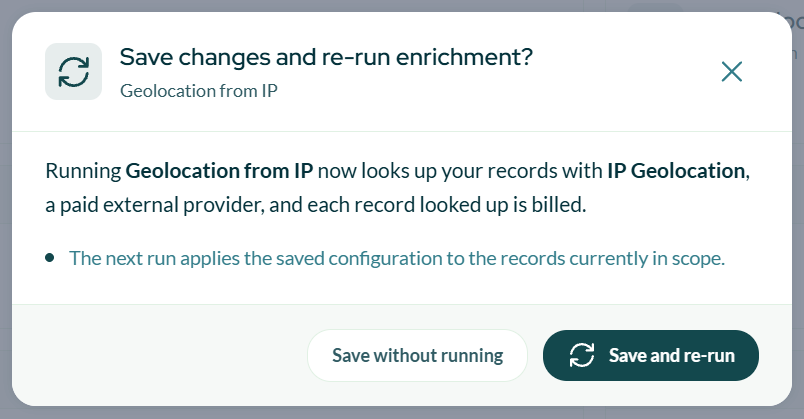
Saving an active enrichment asks whether to run again with the new configuration.
- Save without running — the change is stored and applied on the next scheduled run.
- Save and re-run — the run starts immediately.
On External data, adding, removing or retyping a field means the stored results have to be rebuilt, and the columns read empty until a run refills them. Changing only a label, a field's visibility or the run logic clears nothing. After an edit that clears the columns, the hourly limit on Run now is lifted so you can refill immediately.
On AI, the same is true and it goes further: answers belong to the question that produced them. Edit the question, the columns it reads, or the outputs, and every answer stops counting — the columns read empty, the next run buys them all again at full price, and activation locks until a new test passes.
Either way, the columns feed audiences, signals and AI models, so anything depending on them sees empty values in the meantime. Plan the edit rather than discovering it.
The old answers are set aside rather than deleted. Put the question back to exactly what it was and they become live again, free.
An enrichment cannot be edited while a run is in progress — wait for it to finish.
Statuses
| Status | What it means | What to do |
|---|---|---|
| Draft | Never activated. No columns exist yet. | Open it with Edit and finish the wizard. |
| Active / Ready | Switched on. No runs yet means the first run has not happened. | Wait for the scheduled pipeline, or use Run now. |
| Running | A run is in progress. | Wait — the columns fill in when it completes. |
| Complete | The last run finished. | Nothing. |
| Partial | The last run finished with some values not retrieved. | Nothing, usually — see below. |
| Suspended | Paused by you; skipped by the scheduled pipeline. | Switch the Active toggle back on to resume. |
| Error | The last run failed; the reason is shown on the row. | The next scheduled run retries automatically. See below if it persists. |
A run that partly fails still completes. Values that could not be retrieved or answered are counted, and their columns stay empty for those records. The run history shows how many were asked for, how many came back, how many were reused from earlier runs, and how many failed.
Several enrichments on one table
A table can carry several at once, of either type, and they do not interfere. Each adds its own columns.
One rule, on AI: a question cannot read another AI enrichment's output. Those columns appear in the picker with a lock. If you need an answer that builds on another answer, put both questions in one enrichment, or write a Field Builder calculated field on top of the output. An AI question can read a column produced by External data.
Troubleshooting
| Symptom | What to check |
|---|---|
| The new columns are empty for every record | The first run may not have completed — check the status. If it is Complete, check the columns it reads really contain values; the picker in the wizard shows a sample. |
| The columns are empty for some records | Those records probably have no value in one of the columns it reads, so there was nothing to send. On External data it can also be the provider having no answer for that value — the preview's completeness percentage tells you how often that happens on your data. |
| The columns went empty after an edit | Expected when the fields or the question changed: the values are rebuilt by the next run. Use Run now to refill immediately. |
| Run now is unavailable | A run is already in progress, it was run by hand less than an hour ago, the daily limit is reached, or the enrichment still needs a preview (External data) or a test (AI). The tooltip says which. |
| It is in Error | Read the message on the row. The next scheduled run retries by itself; if it keeps failing, check that the source table and the columns it reads still exist — a schema change can leave an enrichment pointing at something that is gone. |
| A field I selected isn't in the audience builder | Check that the field's visibility toggle is on, and that the enrichment is not Suspended. |
| A column I want to use is locked in the picker | Either it is another AI enrichment's output, or it is not allowed to leave the platform. Only Bytek staff can change the second — ask your contact. |
| I need a provider that isn't in the catalog | The catalog is curated by Bytek. Ask your contact — new providers are added centrally and appear for everyone. |