Creating an AI enrichment
An AI enrichment asks a language model a question about each record, using columns you already have, and stores the answers as new columns on your table — for example, what kind of network a user signed up from, which commercial region their country belongs to, and a one-line note for the support team.
Go to Data Enrichment in the left sidebar, click Add, and choose AI. The wizard has six steps, and you can move back and forth between the steps you have already reached.
| Step | What you do |
|---|---|
| 1 — Setup | Name the enrichment and choose the table it reads from |
| 2 — Prompt | Write the question, naming the columns it reads |
| 3 — Outputs | Declare the columns the answer fills |
| 4 — Scope & test | Narrow the records, then try the question on a sample |
| 5 — Run logic | Choose how often answers are asked for again |
| 6 — Summary | Check everything and activate, or save a draft |
A draft is saved as soon as you leave the outputs step. From then on the enrichment is in the list as a Draft, and you can leave the wizard and pick it up later with Edit.
Looking for facts a provider already holds, like the location behind an IP address? See Creating an External data enrichment.
Step 1 — Setup
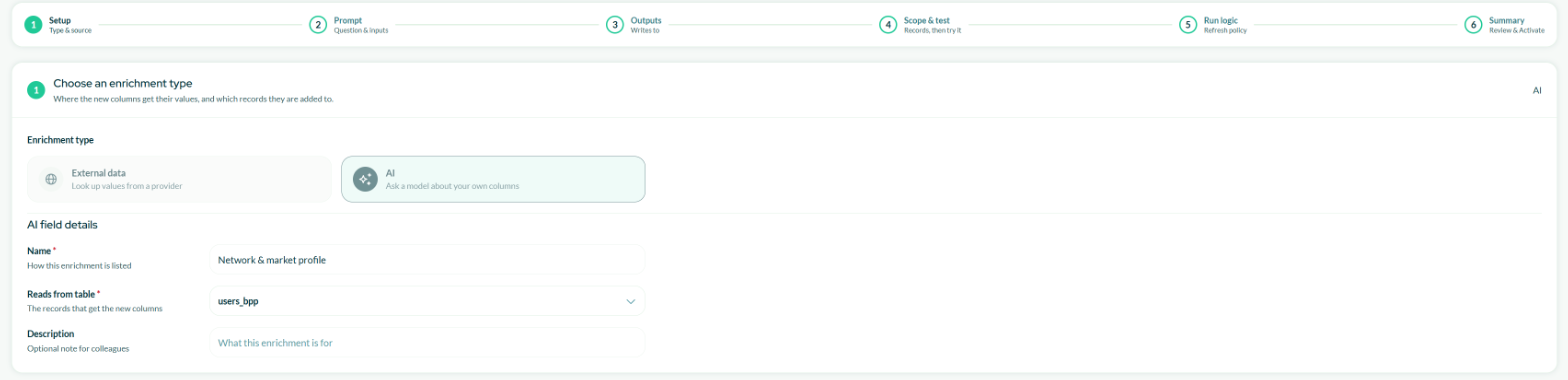
Name the enrichment and choose the table whose records get the new columns.
Give it a name you will recognise in the list — "Network & market profile" or "Review sentiment" is clearer than "Enrichment 1" — and an optional description for your colleagues.
Then choose the table it reads from. The new columns are added to that table, and the question can only read columns from it.
Step 2 — Prompt
Write the question, putting column names in braces:
This user signed up from IP address {ip_address} in country {signup_country}.
Classify the kind of network the IP address belongs to, and the commercial region of the signup country.
Then write one short sentence a support agent could read before contacting this user.
Before the model sees anything, each {column} is replaced with that record's value:
This user signed up from IP address 93.184.216.34 in country DE.
Classify the kind of network the IP address belongs to, and the commercial region of the signup country.
Then write one short sentence a support agent could read before contacting this user.
Use Insert column to pick a column rather than typing its name. The columns you have used appear as chips under the editor, and a chip turns red if the column does not exist, cannot be read, or is not allowed to leave the platform.
The value is dropped in literally, so the sentence has to read correctly once it is there. Classify {user_agent} it as budget or premium becomes nonsense. Putting each column on its own labelled line is the layout that is hardest to get wrong, and it keeps working when a value is empty.
Preview shows the question filled in with real records, and an estimate of the tokens each one costs. It does not call the model, so it is free, and it is the quickest way to catch a token reading the wrong column. Use it every time you change the question.
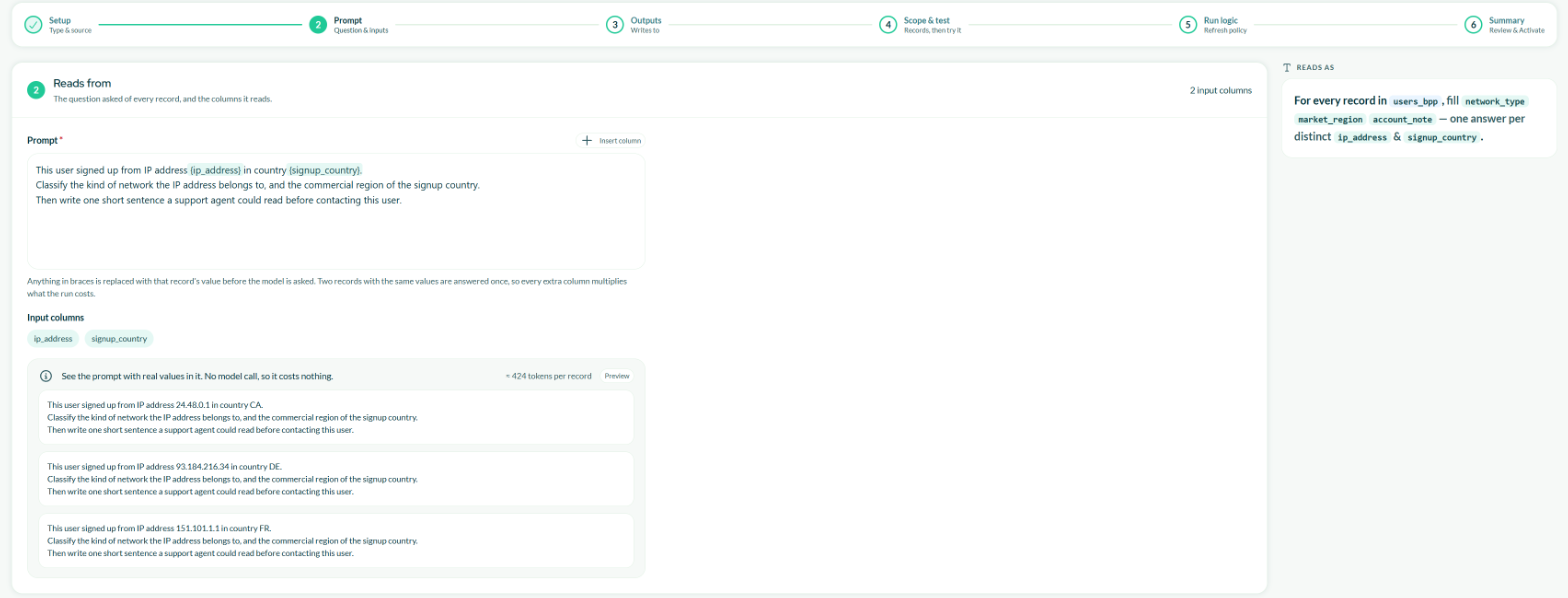
The preview fills the question with real records. It is free: no model call is made.
Two records with the same values in the columns the question reads are answered once. Adding a column that differs on almost every record — an ID, a timestamp, a free-text note — means almost every record is a separate, paid answer.
A record missing any column the question reads cannot be answered. It is not sent, it is not charged for, and its new columns stay empty. If the preview tells you no record has a value in every one of these columns, take it seriously — an enrichment built on those columns would produce nothing.
Step 3 — Outputs
This is where you say which columns the answer fills. One question can fill several.
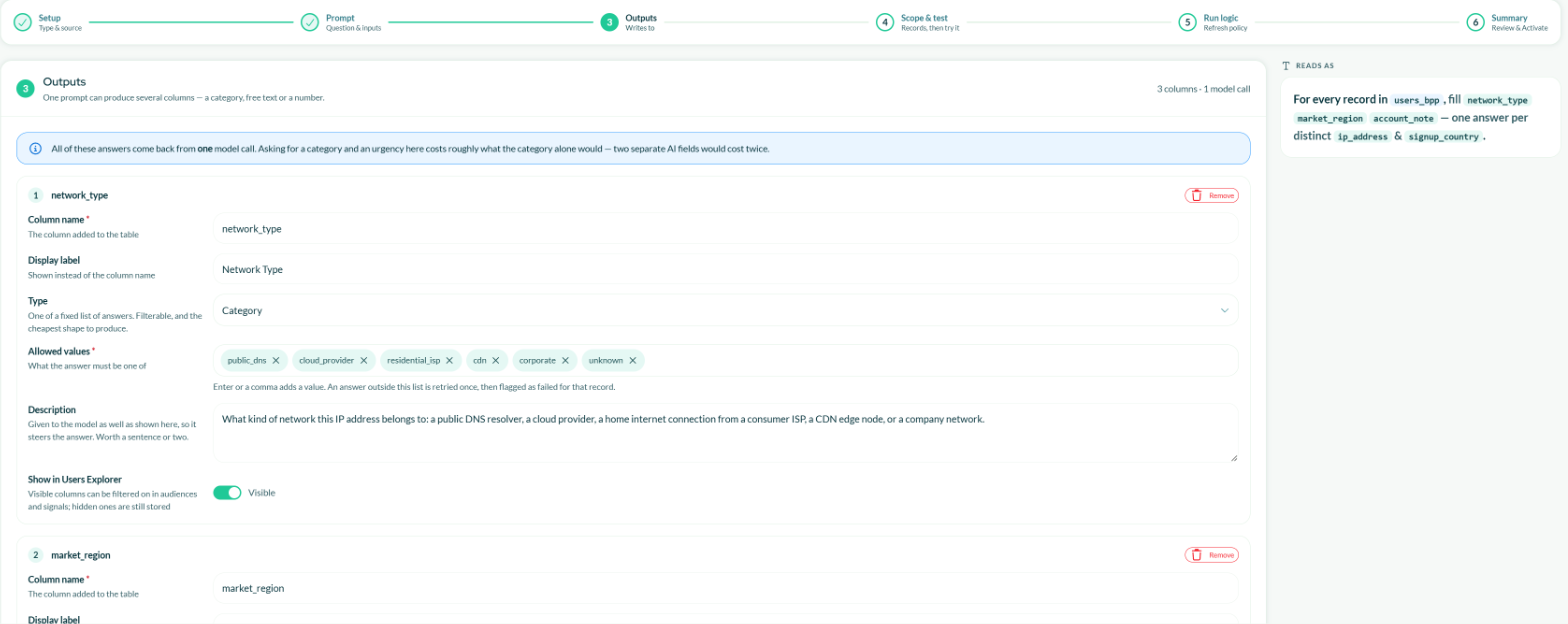
Three outputs from one question: two categories and a free-text note. All of them come back from the same model call.
For each output:
- Column name — the field's name on your table. Letters, digits and underscores.
- Display label — what your team sees in the pickers.
- Type — Category, Text or Number.
- Allowed values — Category only. The list the answer has to come from; press Enter or type a comma to add each one.
- Description — given to the model as well as shown here, so write it like an instruction. "What kind of network this IP address belongs to: a public DNS resolver, a cloud provider, a home internet connection…" steers the answer; "Type" does not.
- Show in Users Explorer — whether the column appears in the pickers. Hidden columns are still stored.
Category is the type to reach for. The model is held to your list, so you get cloud_provider, never "Cloud provider." or "probably a data centre". That makes the column safe to filter and group on.
The model is asked again once. If the second answer is still outside the list, that record is counted as failed and its columns stay empty. The test results show you the failure count.
Text is free text, for a summary or a note. Nothing constrains it, and it is the most expensive type, because the answer is longer. Number is a figure, for a score or a count.
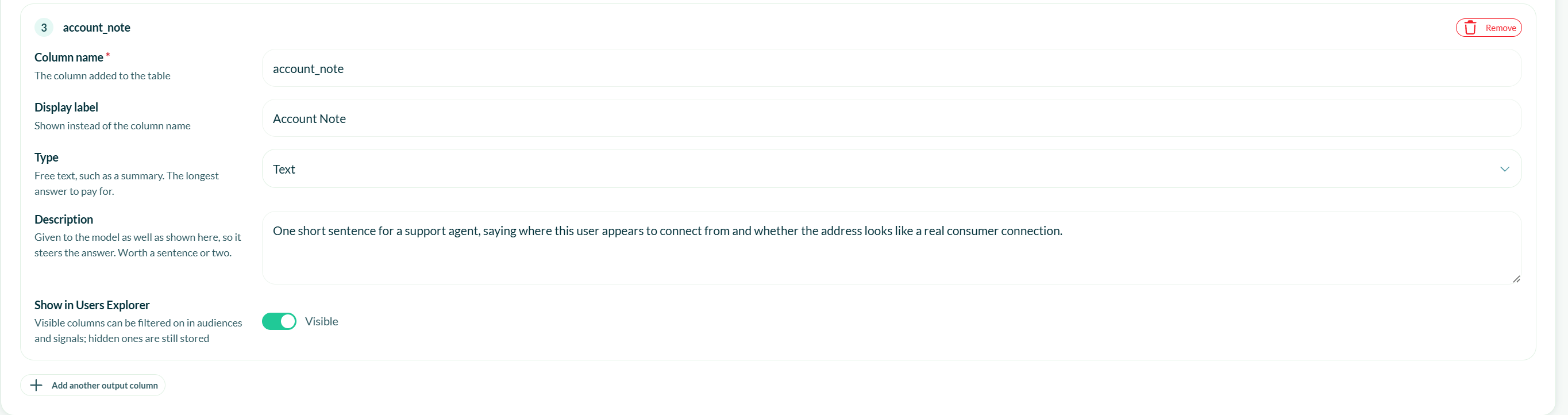
A Text output has no allowed values: the description is all that shapes the answer.
All the outputs on an enrichment come back from a single model call. Asking for a category and an urgency together costs roughly what the category alone would. Two separate AI enrichments would cost twice, so put related answers on one.
Step 4 — Scope & test
Two parts: which records are answered, and trying it before you commit.
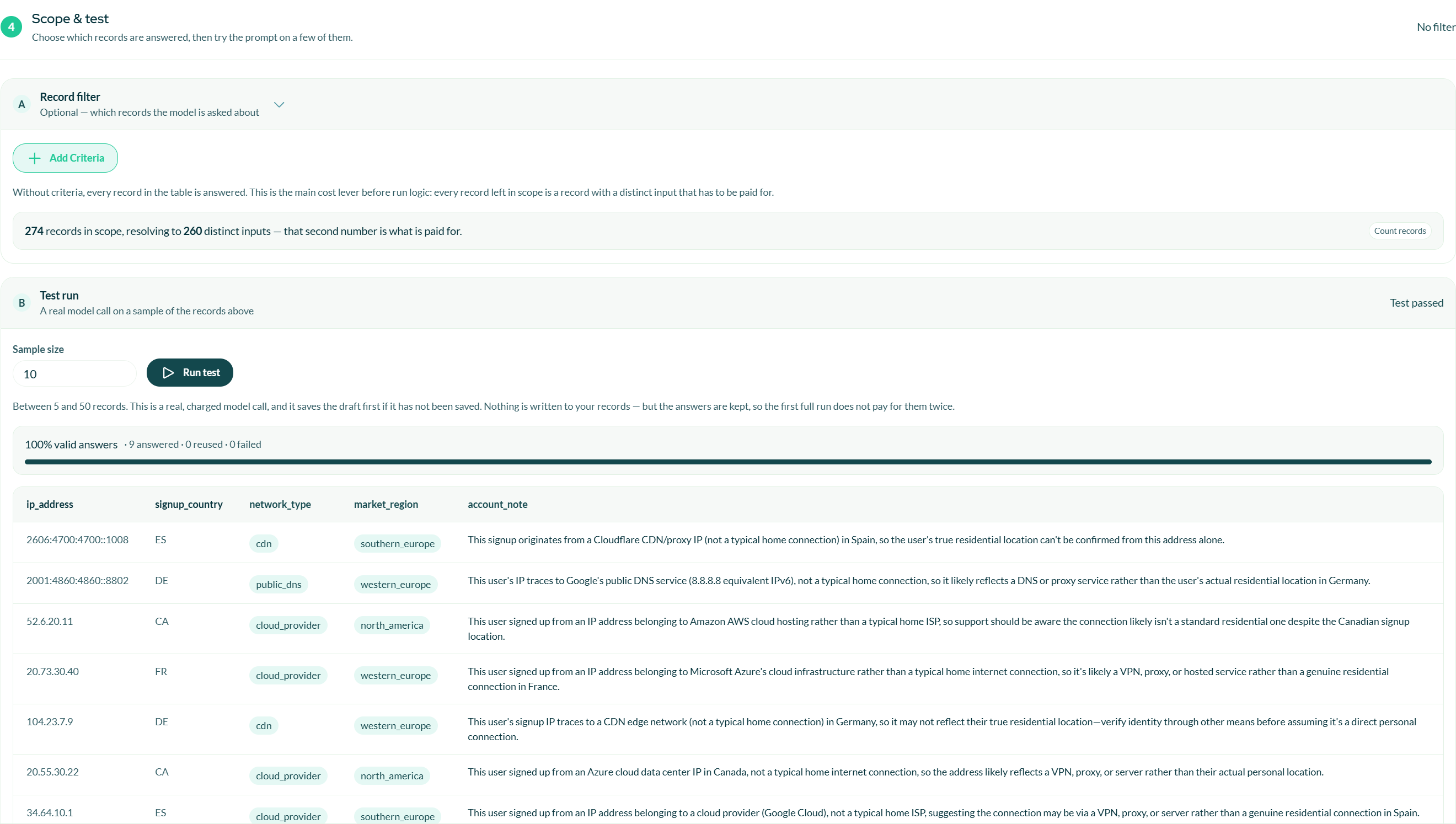
Count the records in scope for free, then run the test on a real sample.
Without a record filter, every record in the table is answered. With one, only the records matching your conditions are. Conditions can use fields from other tables, the same as everywhere else in the platform.
This is the main cost control available to you before run logic. Count records tells you how many records are in scope and how many distinct inputs they resolve to — the second number is what you pay for. On a bookings table, filtering to completed transactions cut the records in scope from 9,995 to 5,350, and the distinct inputs from 5,548 to 3,420. Count with the filter off, then on, and compare. It is free.
Run test asks the model about a sample of 5 to 50 real records and shows the answers beside the inputs that produced them, with the share of valid answers and how many were answered, reused or failed. The test runs in the background: you can leave the page and the result is picked up when it finishes.
A test proves the question works on your data before it runs over everything. It is a real, billed call, which is what makes it a real test, and it is limited to ten tests per hour.
The test has to have passed on the current configuration. Change the question or the outputs afterwards and the wizard asks for a new one, because the results you were shown no longer describe what would happen.
Nothing is written to your records by the test, but the answers are kept, so the first full run does not pay for them a second time.
Step 5 — Run logic

The default answers each set of input values once and never pays for it again.
Choose how often an answer you already have is asked for again. Every option covers records never answered before, on every scheduled run; they differ only in how an existing answer is treated.
| Option | What it does | Use it when |
|---|---|---|
| Answer new records only | A set of input values is answered once and never asked again. | The answer cannot change — the sentiment of a review written last year. Cheapest, and the default. |
| Answer new records, and refresh older answers | New records immediately; an existing answer is asked for again once it is older than the window you set. | The answer can drift over time and you want it reasonably current. |
| Re-answer everything on every run | Every record in scope is asked again on every run. | Rarely. Only when the source text itself keeps changing. Most expensive. |
AI enrichments are answered by the nightly pipeline, after the AI models and before audiences are rebuilt — so segments are always built on values you can see. That is why this step asks how often answers are refreshed, not when the job runs.
Step 6 — Summary
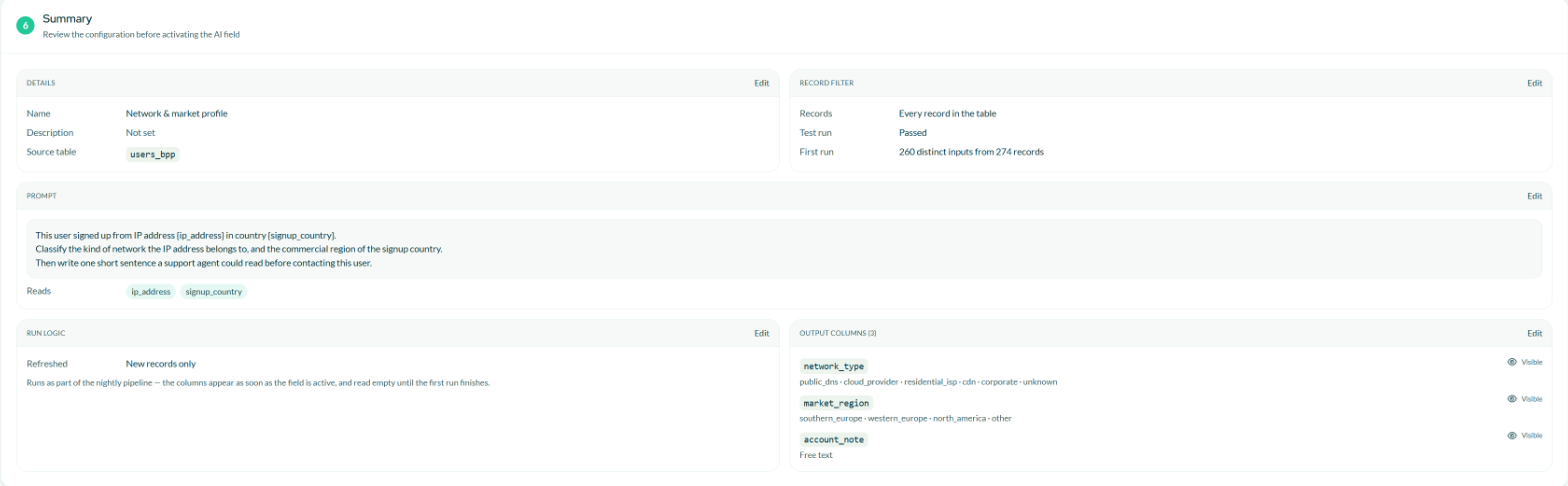
The summary shows the prompt as it will be asked, whether the test passed, and the outputs it fills.
Check everything — the Record filter block also shows whether the test passed and how many distinct inputs the first run will pay for. Then finish in one of two ways:
- Save draft — stored and nothing else happens. No columns are created, nothing is answered.
- Activate AI field — a confirmation spells out how many columns will be added, to which table, and how many distinct answers will be paid for under which filter.
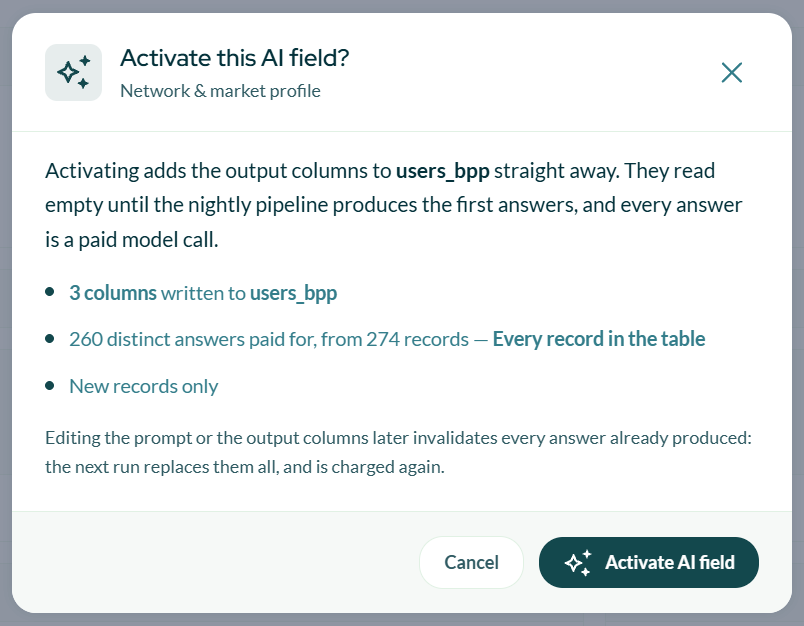
The confirmation states what will be paid for before anything is.
Once you confirm, the columns appear on your table immediately and read empty until the nightly pipeline produces the first answers.
Changing the question or the outputs invalidates every answer already produced. The next run buys them all again, and the columns read empty in the meantime. Get the question right with the preview and the test before activating.
Changing the filter or the run logic is free — those decide which records are covered, not what the answer is.
Next
- Managing enrichments — running, pausing, editing, and what each status means.
- Data Enrichment overview — how costs work and where the new columns appear.