Data Enrichment
What it does
Data Enrichment adds information to your records that your own data doesn't contain. You point BPP at columns you already have, and it brings back new ones.
There are two types, and they differ only in where the new values come from:
| Type | Where the answer comes from | Good for |
|---|---|---|
| External data | A specialist data provider looks the value up in their database. | Facts someone else already holds — the city behind an IP address, the operator behind a phone number. |
| AI | A language model reads the columns you name and works the answer out. | Values that need reading and judgement — is this review angry, what is this message about. |
Everything else is the same. Both live in one list, both start from the same Add button — each with its own guided steps — both are paid for per distinct value rather than per record, and both turn into ordinary columns on your table. Once an enrichment is running, those columns behave like any other field: filter audiences on them, use them in signals, explore them in Users Explorer, feed them to the AI models.
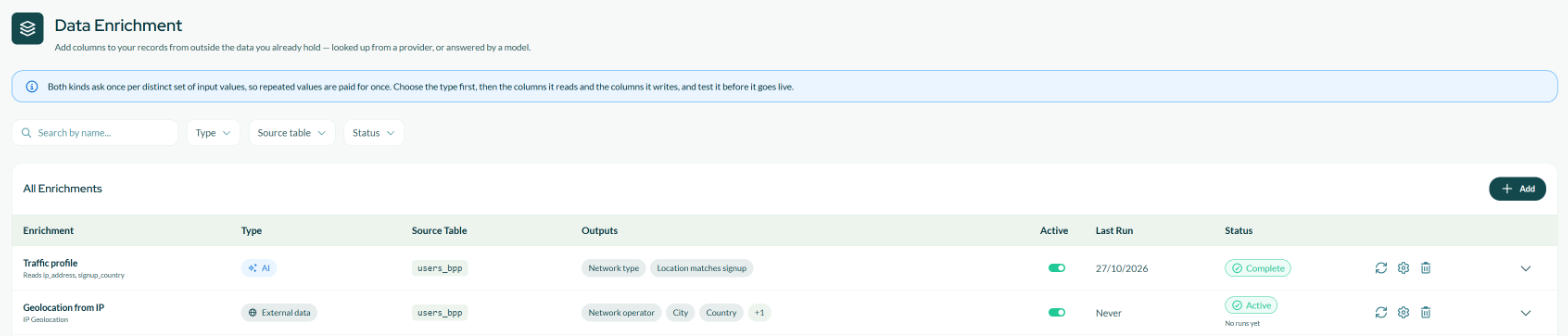
The Data Enrichment page — one row per enrichment, with its type, source table, the columns it adds and its status.
The providers and the model are contracted and paid for by Bytek. You never create a connection, never enter an API key and never see a bill — you pick a type, configure what you want, and the platform handles the rest.
Which one you want
Before reaching for either, check whether the value is something the platform can give you for free.
| You want | Use |
|---|---|
| A value your data already implies — a total, a ratio, a flag, a date difference | Field Builder calculated or aggregated field. Free. |
| A value that is a straight lookup — a code that maps to a name | Field Builder lookup. Free. |
| A value that exists in someone else's database — the city behind an IP | Data Enrichment, External data. Paid per distinct value. How to create one. |
| A value that needs reading and judgement — is this review angry | Data Enrichment, AI. Paid per distinct answer. How to create one. |
If you can express the rule, express the rule. A calculated field is free, instant, and gives the same answer every time. Reach for an enrichment when the question genuinely needs a provider's database or someone's reading of the text, and nothing shorter will do.
How it works, in plain terms
- You create an enrichment: the type, the table, the columns it reads, and the fields you want back. For External data you map a column to the provider's input; for AI you write the question and declare the outputs.
- BPP collects the distinct values of the columns it reads. If 5,000 users share 900 different IP addresses, the provider is asked about 900 values, not 5,000 records.
- Each distinct value is sent once — to the provider or to the model — and the answer is stored privately.
- The answers are attached back to every record carrying the matching value, and appear as new columns on your table.
- It runs again as part of your platform's scheduled pipeline. External data runs before the AI models so the models see the enriched columns; AI runs after them and before audiences are rebuilt, so segments are built on values you can see.
Two consequences worth knowing, and they apply to both types:
- New values are picked up automatically. Every scheduled run covers values that have appeared since the last one — new records get their columns filled without you doing anything.
- Values you already have are only looked up again if you ask. How often is the run logic you choose in the wizard.
What it costs
This is where estimates go wrong by an order of magnitude. The provider or the model is asked once per distinct combination of the columns your enrichment reads, and every record sharing that combination shares the answer.
An enrichment over 10,000 users that reads only country and device type might produce 27 different answers. You pay for 27, not 10,000.
The same enrichment reading a review text instead, where almost every record differs, is closer to one answer per record — and costs accordingly.
So the columns it reads decide the bill. Adding a column that is unique per record, like an ID or a timestamp, turns a cheap enrichment into an expensive one without changing the question at all.
The wizard shows you the numbers before you commit: how many records are in scope, and how many distinct values they resolve to. Checking is free, as often as you like.
Three more things keep the spend predictable:
- Values already answered are not bought again, unless your run logic says to refresh them.
- The test in the wizard is a real, billed call on a small sample. That is what makes it a real test.
- Running by hand is rate-limited — one manual run per enrichment per hour. External data also caps manual runs at ten a day per user.
Where the new columns appear
Once an enrichment is active and its first run has completed, the columns show up wherever fields are used:
| Where | What you can do |
|---|---|
| Audiences | Filter on them, e.g. "City is Milan", "Sentiment is negative". |
| Signals | Use them in conditions like any other field. |
| Users Explorer | See the value on each profile. |
| AI Models | The models pick up the columns as additional features. |
| Field Builder | Build calculated fields on top of them. |
Each field carries a visibility toggle: turn it off to keep the column but hide it from the pickers.
Activating an enrichment adds the columns straight away, and they read empty until the first run finishes. That is expected. Anything reading them — audiences, signals, models — sees empty values until then.
Status
The Status column shows whether an enrichment is switched on and how its last run went. External data rows show the two separately, one badge above the other; AI rows fold them into one.
| Status | What it means |
|---|---|
| Draft | Configured but never activated. No columns exist and nothing has been looked up. |
| Active | Switched on: the columns exist and every scheduled run keeps them up to date. No runs yet underneath means the first run has not happened. On an AI row, Ready means the same thing. |
| Running | A run is in progress. |
| Complete | The last run finished. |
| Partial | External data only: the last run finished, but some values could not be retrieved. Their columns stay empty for those records. |
| Suspended | Paused by you. Skipped by the scheduled pipeline; the values already retrieved are kept, so resuming does not pay for them again. |
| Error | The last run failed. The reason is shown on the row, and the next scheduled run retries. |
What leaves the platform
To answer, the provider or the model has to be sent the values your enrichment reads. Nothing else is sent: not the whole record, and not columns the enrichment does not name.
Every column in your schema carries a switch saying whether its values are allowed to leave the platform. Only Bytek staff can change it. Columns declared as user identifiers start blocked, whatever their type is called; every other column starts open. A blocked column cannot be used: in an AI prompt its chip turns red and says so, and an enrichment that tries to use one is refused when you save it — or refused at run time, if the column was closed after the enrichment went live.
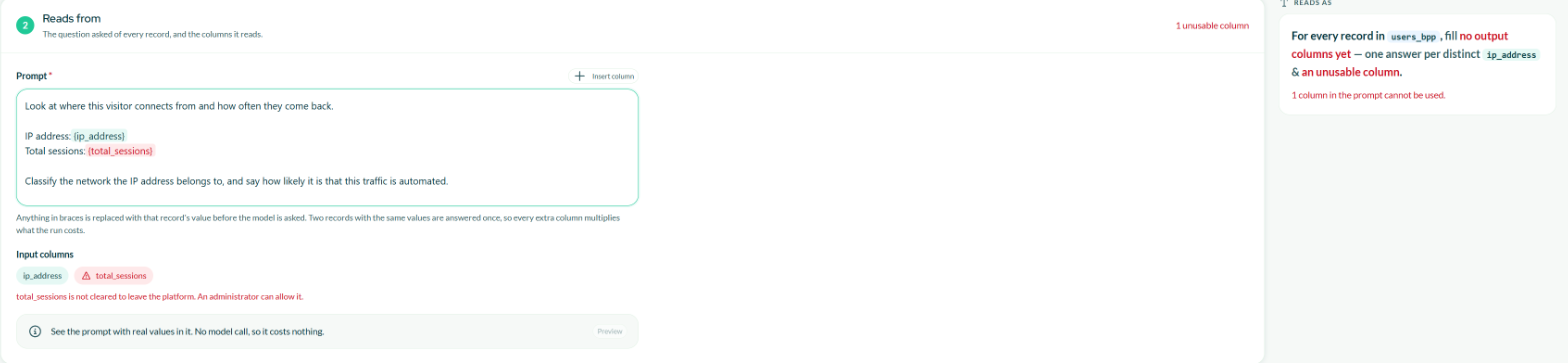
A column that is not cleared to leave the platform is flagged in red, and the wizard will not move on until it is removed.
If you need a blocked column opened, ask your Bytek contact. If you would rather a sensitive column were never usable here, ask for it to be closed.
Learn more
- Creating an External data enrichment — the provider wizard, one screen at a time.
- Creating an AI enrichment — the AI wizard, one screen at a time.
- Managing enrichments — running, pausing, editing, and what each status means.